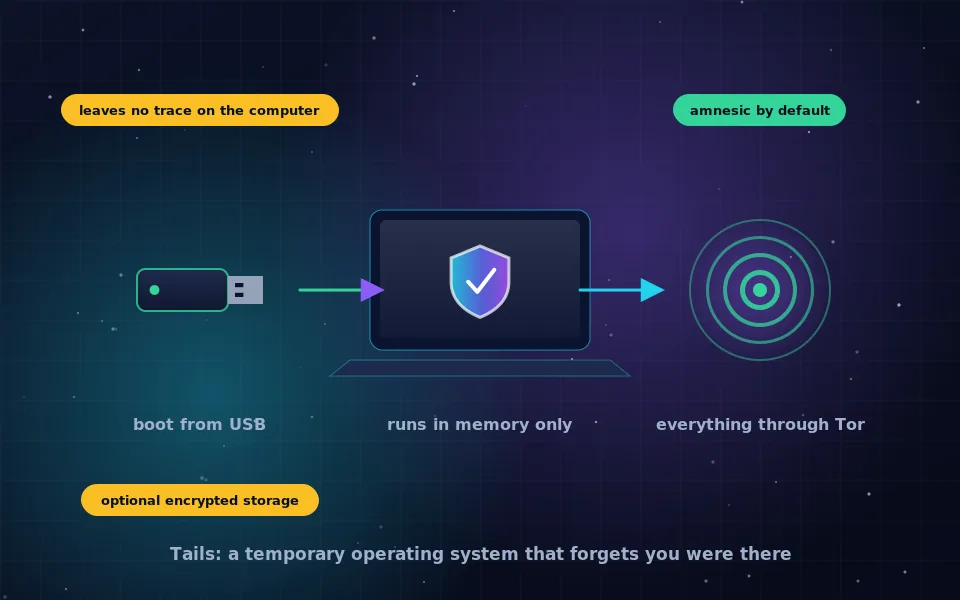
Tails OS is a free operating system that starts from a USB stick, runs entirely in the computer's memory, sends all internet traffic through the Tor network and erases every trace of itself when you shut down. The name stands for The Amnesic Incognito Live System, and each word describes a design decision: amnesic because nothing is saved unless you choose to, incognito because everything goes through Tor, live because it runs without being installed.
People come to Tails when a private browser is not enough: when they need to use a computer that is not theirs, when they cannot risk leaving files behind, or when they want an environment where the safe choice is the only choice. This guide explains how Tails works, why its design makes it safe, what it cannot protect against, the hardware it needs, which laptops work well, and why it does not run on phones or on the newest Macs.
How Tails works
When you boot a computer from a Tails USB stick, the computer's own hard drive is not touched. Tails loads into RAM and runs from there. Because RAM is cleared when power is removed, shutting down destroys the session: browsing history, downloaded files, typed documents, everything. Tails even overwrites memory during shutdown to guard against recovery.
Every network connection is forced through Tor. Applications cannot reach the internet directly, because the system's firewall blocks anything that is not going through Tor. That removes an entire class of leaks that ordinary systems suffer from, where a program bypasses a proxy or a document phones home.
Tails ships with the tools most people need: Tor Browser, an email client, an office suite, image and sound editors, a password manager, and utilities for encrypting files and cleaning metadata. All are preconfigured to work safely within the system.
If you need to keep something between sessions, Tails offers an optional Persistent Storage: an encrypted partition on the USB stick that you unlock with a passphrase at startup. You choose what goes in it, and everything else remains amnesic.
Why the design makes Tails safe
Most anonymity failures are not broken encryption; they are mistakes. Someone opens a downloaded file that fetches a resource outside Tor, or a program updates itself over the normal network, or a file saved to the desktop is found later. Tails is built to make those mistakes impossible rather than merely discouraged.
- No traffic leaves except through Tor, enforced by the firewall rather than by application settings.
- Nothing is written to the computer's disk, so nothing is left to find.
- The system is the same for everyone, so a Tails user looks like every other Tails user.
- Tails is free software, developed in the open, reviewed and audited, with a track record of use by people whose safety depends on it.
- Updates are frequent and the project publishes security notices promptly.
The result is a system where you have to work to make an anonymity mistake, which is the opposite of an ordinary computer.
What Tails cannot protect against
Tails is honest about its limits, and its own documentation lists them. The important ones:
- A compromised computer. If the machine's firmware or hardware has been tampered with, Tails cannot detect or defend against it.
- A compromised USB stick. If your Tails installation was modified by someone else, the protections are void. Install Tails yourself, from the project, and verify it.
- Your own behaviour. Logging in to personal accounts, sharing identifying details, or using Tails and your normal identity on the same network at the same time link you regardless of the system.
- Tor's own limits. An observer who can see both your connection and the destination can correlate them. Tails does not change how Tor works.
- Metadata in files you create. Tails includes a tool to clean it, but you must use it.
- Strong adversaries with physical access to a running Tails machine, because the session is in memory while it runs.
Tails is a tool for making good practices automatic. It is not a substitute for knowing what you are protecting against, which is why the OPSEC guide on this site is worth reading alongside it.
Tails OS requirements
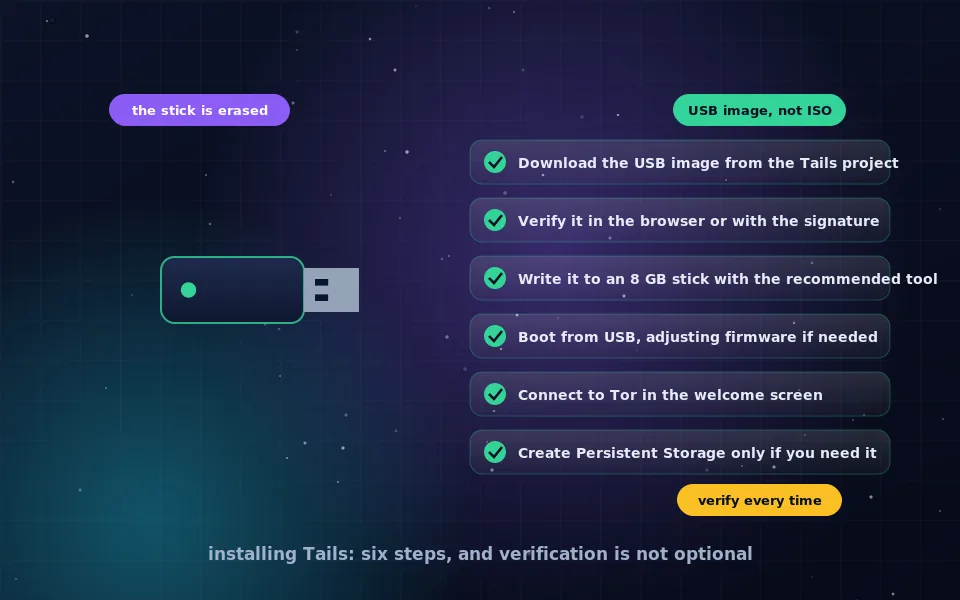
The requirements are modest. Tails needs a 64-bit x86 processor, which means almost any PC laptop or desktop and Intel-based Macs. It needs at least 2 GB of RAM to boot and 4 GB or more for comfortable use. It needs a USB stick of at least 8 GB, and the stick will be erased during installation. The computer must be able to boot from USB, which nearly all can, though on some machines you must disable Secure Boot or pick the USB device from a boot menu.
Tails cannot run on ARM processors, which rules out Apple silicon Macs, most tablets and all phones. It also does not support some Wi-Fi chips that need proprietary firmware; a USB Wi-Fi adapter with free drivers solves that on affected machines.
Choosing a laptop for Tails
Because Tails is a live system, the best laptop for Tails is one it boots on reliably, rather than anything exotic. A few practical points guide the choice.
A machine with a mainstream Intel or AMD processor, ordinary Intel Wi-Fi, and a straightforward boot menu is the safest bet. Older business laptops are popular for this because they are cheap, well supported and have no unusual hardware. Avoid very new models for the first months after release, because their hardware may not yet be supported by the Linux kernel Tails ships. Check the Tails project's list of known hardware issues before buying. If the laptop will be used only for Tails, removing or wiping its internal drive removes any doubt about what could be recovered from it.
Some people dedicate a cheap laptop to Tails alone; others use Tails on their everyday laptop when needed. Both work. The dedicated machine avoids the risk of accidentally booting into the ordinary system on a network where that would matter.
Tails on Android, Mac and other platforms
Searches for Tails on Android or a Tails app come from a reasonable wish, but there is no such thing. Tails is a full PC operating system for x86 hardware; phones and tablets cannot boot it, and no app replicates it. For anonymous use of a phone, Tor Browser on Android is the tool, with the phone's own identifiers as the unavoidable limit.
On Intel Macs, Tails generally works: hold the Option key at startup and select the USB stick. Some models have Broadcom Wi-Fi that Tails cannot drive; a USB adapter fixes it. On Apple silicon Macs, Tails does not run at all. There is also no way to install Tails as a normal macOS or Windows application; it replaces the running system for the duration of the session, which is the entire point.
What the project and its users report
The picture above matches what the Tails project says about itself and what people who depend on it have described.
The Tails project's documentation states its design goals plainly, enumerates the threats it does and does not protect against, and warns specifically about compromised hardware, modified installations and user behaviour. That candour is one reason security trainers trust it.
Digital-rights organisations that train journalists and activists recommend Tails for high-risk situations, particularly when working on borrowed or shared computers, and pair it with training in habits, because the system removes technical mistakes but not behavioural ones.
Security researchers who have examined Tails note that its enforced Tor routing and amnesic design eliminate whole categories of leaks seen in ordinary systems, and that its remaining exposure is largely the same as Tor's plus the physical security of the machine and USB stick.
Try Tails on a spare USB stick
Read the installation guide on this site, download Tails from the project, write it to an 8 GB stick and boot a laptop from it. Spend an hour browsing, opening the bundled applications and seeing what a system built around anonymity feels like. Then shut down and notice that the computer is exactly as you left it. That experience is the best explanation of what Tails is.
Frequently asked questions
What is Tails OS in simple terms?
Tails is a free operating system based on Debian that you start from a USB stick instead of installing. It runs entirely in memory, forces all internet traffic through Tor, and leaves no trace on the computer when you shut it down. The name stands for The Amnesic Incognito Live System.
Is Tails OS safe?
Tails is developed openly, audited, and used by journalists and human rights workers, and its design protects against many common mistakes by making them impossible. It is not a guarantee: a compromised computer firmware, a malicious USB stick or your own behaviour can still identify you. It is one of the safest general-purpose tools available for anonymity.
What are the Tails OS requirements?
A 64-bit computer that can boot from USB, at least 2 GB of RAM with 4 GB or more recommended, and a USB stick of at least 8 GB. Most PCs and Intel Macs from the last decade work. Apple silicon Macs are not supported.
Can I run Tails on Android?
No. Tails is a PC operating system that boots from USB and requires a 64-bit x86 processor. Phones and tablets cannot run it. For anonymous browsing on a phone, use Tor Browser on Android or Onion Browser on iOS with the limits described in those guides.
Does Tails work on a Mac?
On Intel-based Macs, usually yes, by holding the Option key at startup and choosing the USB stick, though some models have Wi-Fi hardware without free drivers. On Macs with Apple silicon, no; Tails does not support that architecture.
Last reviewed and updated on . Plain text version: /anonymity/tails-os.txt.